How to Check If a Backlink Is Indexed
How to check if a backlink is indexed
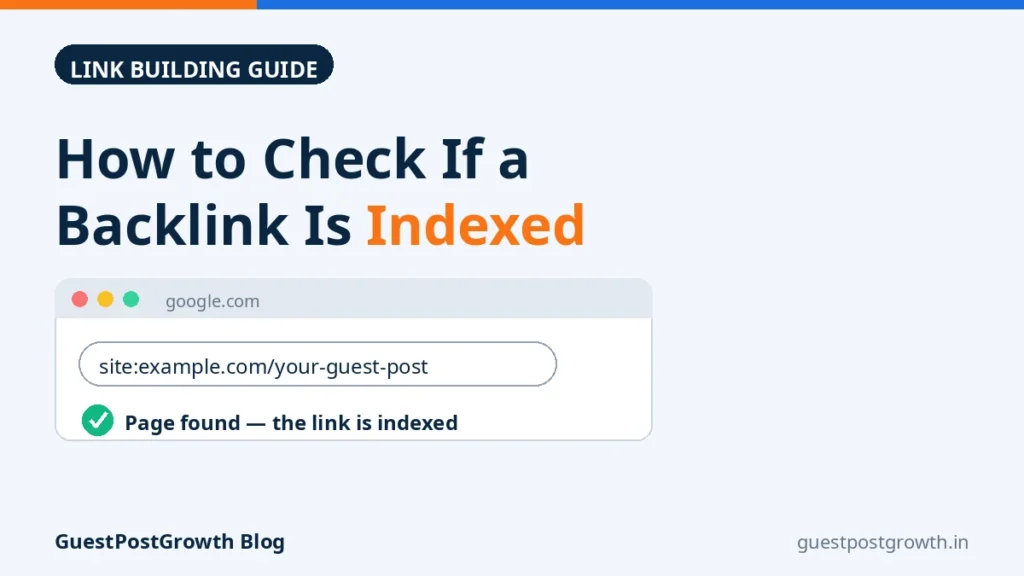
The quickest way to check if a backlink is indexed is to test the page that carries your link, not your own page. Go to Google, type site: followed by the full URL of the linking page (for example, site:example.com/blog/the-article) and search. If that page appears in the results, it is in Google’s index, which means Google has crawled it and had the opportunity to register your link. If nothing appears, the page is probably not indexed yet — although this test is approximate, and this guide shows how to confirm it properly.
The distinction matters because a backlink only starts counting once Google has crawled and indexed the page it sits on. A link can be live on the page, dofollow, correctly anchored and visible in every SEO tool you own — and still be contributing nothing today, because Google has never stored that host page in its index. Below are five working methods to check index status, what each one can and cannot prove, why links stay unindexed, how long to realistically wait, and what to do — including what to demand from a seller — when a link is not indexed.
5 working methods to check a backlink’s index status
Method 1: The site: search with the exact URL
This is the method from the opening paragraph, and it remains the best first test for a handful of links. Search site: plus the exact URL of the page holding your link. The page appearing in the results is good evidence it is indexed. Accuracy limit: search results are a sample of the index, not a direct window into it, so a page can occasionally be indexed yet fail to surface for this query — very new and low-value pages are the usual false negatives. Treat a single empty result as “unconfirmed”, not as proof, and cross-check with Method 2 before concluding anything.
Method 2: Search a unique sentence from the page, in quotes
Open the linking page, copy one distinctive sentence from its text — a full, specific sentence, not a generic phrase — and search for it inside quotation marks. If the page comes back, Google has indexed its content, which settles the question the site: test left open. If neither query finds anything, you can be reasonably confident the page is not indexed. Slow, but for one important link — a guest post you paid real money for — it is the most reliable free check available.
Method 3: Google Search Console — with the ownership catch
Most guides tell you to “use the URL Inspection tool”, and most skip the catch: URL Inspection only works for websites you own and have verified in Search Console. You cannot inspect a publisher’s page in your own account, and no legitimate tool can do it for you. What you can use is the Links report inside your own site’s Search Console property. If Google lists the linking page or its domain among your external links, Google has found and recorded that link — strong evidence the host page was crawled and indexed. The limits: the report shows a sample rather than every link Google knows about, updates slowly, and a link missing from it is not proof of anything — absence means “not displayed”, not “not indexed”.
Method 4: Bulk index-checker tools, for long lists
Checking 300 delivered links one by one is not a workflow, so bulk index checkers exist: paste in a list of URLs and the tool reports which ones it believes are indexed. They are genuinely useful for triage — sorting a report into “confirmed” and “needs a closer look”. Understand the limit, though: most of these tools automate variations of the same Google queries described above, so their results inherit the same approximations, and different tools disagree at the margins. Use them to prioritise, then manually verify with Methods 1 and 2 any link you intend to query with a seller. If you have bought a volume package — cheap backlinks in the hundreds, for instance — bulk triage first is the only sane order of operations.
Method 5: Your SEO tool’s backlink report — useful, but it proves something else
Ahrefs, Semrush, Moz and similar platforms will often show your backlink as “live” days before Google indexes the host page, because they run their own crawlers — their crawler finding a link proves only that their crawler found it. Treat the SEO tool report as a discovery signal, not an index verdict. It is still informative: if a major tool found the page weeks ago, the page is clearly crawlable, so a continued absence from Google’s index starts to say something about how Google rates that page — a quality question, not a discovery question.
Crawled vs indexed — the difference that confuses everyone
Google’s pipeline has three separate stages: a page is discovered (Google learns the URL exists), crawled (Googlebot visits and downloads it), and indexed (Google analyses it and stores it in the index). Each stage can fail independently. A page can be crawled and then deliberately not indexed — site owners see this in Search Console as “Crawled — currently not indexed” — because Google judged the content thin, duplicated elsewhere, or not worth a slot. For backlink purposes, only the third stage counts: an unindexed page’s links are not registered, whichever earlier stages it passed.
The reverse trap also exists: an indexed page does not automatically mean a fully counted link. If Google has canonicalised the linking page into a different URL, the value flows to the canonical version. And an indexed page carrying your link as nofollow is indexed but passes no traditional link equity — a separate question from indexation, covered in our guide to dofollow vs nofollow backlinks. Verifying which one you actually received takes about a minute by hand — see how to check if a backlink is dofollow. Index status answers one question — “does Google know this page exists?” — and it is worth answering accurately.
How long does a backlink take to get indexed?
Google publishes no timetable and guarantees neither crawling nor indexing, so every range below is an experience-based estimate from checking delivered links, not measured data — treat any seller or tool quoting you an exact figure with suspicion.
- Pages on busy, established sites — active blogs, news sites, anywhere Googlebot visits daily: often indexed within hours to a few days.
- A typical guest post or niche-edit page on a mid-sized site: commonly several days to around two weeks.
- Pages on quiet, small or rarely crawled sites — and profile-type pages in particular, which Google is selective about: several weeks is normal, and some are never indexed at all.
The main variable is how often Google already crawls the host site, which tracks closely with the site’s overall authority and publishing activity — one more reason the authority of the linking site matters, as we explain in our guide to what a good DA for backlinks looks like. Our working rule when auditing deliveries: run the first check at about two weeks after placement, and do not reach a verdict until about 30 days. Checking daily before that measures only your impatience.
Why a backlink might not be indexed
- The page is simply new. The single most common reason, and the one patience fixes.
- The host site is crawled rarely. Small, inactive sites can wait weeks between Googlebot visits.
- The page is buried or orphaned. A page several clicks deep, absent from the site’s sitemap and with no internal links pointing to it, gives Googlebot few paths in.
- The content is thin or duplicated. Syndicated press-release copies are the classic case: Google crawls them, recognises the duplicate, and indexes one version — often not the one carrying your link.
- The page is blocked or tagged noindex. A noindex meta tag, an X-Robots-Tag header, or a robots.txt block on the host page prevents indexing entirely — and the buyer usually cannot see or fix any of them.
- Google canonicalised it elsewhere. The page was crawled, but Google folded it into a similar URL it prefers.
- It is a page type Google often skips. Fresh profile pages, tag listings and similar low-content pages are indexed selectively at best.
- The page itself is broken. Errors, redirect chains or a page removed after delivery — always confirm the link is still live before investigating indexation.
What to do when a link is not indexed
- Confirm the link is actually there. Open the page, view the source, find your anchor and target URL — many “indexing problems” turn out to be missing links.
- Confirm the verdict with two methods — the site: test plus the quoted-sentence test — so you are not chasing a false negative.
- Wait out the window that fits the site. A few days for an active site, roughly two to four weeks for a quieter one. Indexing cannot be hurried from outside.
- Help discovery along legitimate paths. The most effective lever is internal: ask the publisher to link the page from a relevant category page, a recent-posts list, or another article, so Googlebot reaches it in normal crawling. Sharing the page where a real audience might read it also creates natural discovery routes.
- If it is your own site, use Search Console. For pages you own, URL Inspection plus a crawl request is legitimate and useful. It does not exist for third-party pages, and anyone claiming to submit your links “through Search Console” on sites they do not own is misdescribing what they do.
- After the window, escalate — with evidence. If a link is still unindexed around the 30-day mark on a page that plainly should index, contact the seller with the URL, the placement date and your check results, and ask them to promote the page internally or replace the placement under the terms you agreed.
What not to do: do not blast the URL through mass ping services or automated submission networks. Pinging was a blog-era notification mechanism; submitting a URL to hundreds of services at once creates no trust and no reason for Google to index anything. No technique forces Google’s decision — anyone selling guaranteed indexing is promising you control over a system they do not control.
Bought your links? How to audit a delivery report
If you buy link building, index-checking is how you verify what you actually received. A proper delivery report should give you, for every placement: the live URL, the placement date, the anchor text and target page, and the follow status. (Our published sample report shows the format before you order.) Then run this audit:
- On delivery day, verify liveness, not indexation. Open a sample of the URLs — every tenth row is a reasonable audit — and confirm each page loads and your link is present with the agreed anchor. Dead links and missing links are the seller’s problem immediately; indexing is not yet a fair complaint.
- Sort links into three buckets. Indexed (confirmed by your checks), live but not yet indexed (normal inside the window), and dead or missing (act now). Most disputes come from treating the second bucket as the third.
- Re-check the full list at about two weeks, and again at about 30 days. Bulk-check for triage, manual checks for anything you plan to dispute.
- Judge the pattern, not single links. A couple of slow pages in a large batch is normal. A batch where almost nothing indexes after 30 days tells you the placements sit on pages Google does not value — a quality problem, and a legitimate thing to raise.
One boundary should be agreed before money changes hands: indexing is Google’s decision, so a fair seller guarantees the placement — a live link on a real page, replaced if it dies — and cannot honestly guarantee that Google will index the page, or when. A seller who promises guaranteed indexing is promising someone else’s behaviour. Agree in advance what happens to links still unindexed past an agreed date, and most later arguments disappear.
A short, honest note on paid links and indexing services
Two things deserve stating plainly. First, Google’s link-spam policies treat links bought to manipulate rankings as a policy violation, and no checking technique makes a paid link “policy-proof” — buyers should understand that risk rather than be told it does not exist. Second, the indexing-services market sells speed of discovery, not indexing itself: at best, a decent service creates legitimate paths for Googlebot to find a page sooner. It cannot change Google’s decision about whether the page deserves a place in the index, and a page Google keeps refusing is a page-quality signal, not a submission problem. Money spent submitting weak pages repeatedly is usually better spent on placements on pages Google already crawls and values.
Frequently asked questions
Does a backlink count if the page it is on is not indexed?
Not yet. Google has to crawl and index the host page before the link on it is registered at all. An unindexed page’s links may start counting later if the page gets indexed, but until then they contribute nothing.
How long should I wait before worrying about an unindexed backlink?
As a working rule from delivery audits: first check around two weeks after placement, and judge at about 30 days. Links on busy sites usually index within days; links on quiet sites legitimately take weeks. These are experience-based windows, not guarantees.
Can I check a backlink in Search Console if I do not own the linking site?
No. URL Inspection works only for your own verified properties. For someone else’s page, use the site: and quoted-sentence searches, and check your own site’s Links report — if Google lists the link there, it has found it.
Does the cache: operator still work for checking indexing?
No. Google retired the cache: operator in early 2024, so older guides recommending it are out of date. A cached snapshot never showed current index status anyway — use the site: test and the quoted-sentence test instead.
Can a seller or an indexing service guarantee my backlinks will be indexed?
No. They can guarantee placement on a live page, and they can help Google discover the page, but the indexing decision belongs to Google alone. Treat any guarantee of indexing — especially within a fixed number of hours — as a warning sign.
My SEO tool shows the link as live. Does that mean Google has indexed it?
No. It means that tool’s own crawler found the link. SEO tools crawl independently of Google, so a link can appear in their reports days or weeks before Google indexes the page — or, on a page Google rates poorly, without the page being indexed at all.
The bottom line
Checking whether a backlink is indexed takes two minutes per link: a site: search on the linking page’s URL, backed up by a quoted-sentence search, with Search Console’s Links report and bulk checkers playing supporting roles at scale. What separates a useful check from an anxious one is the calendar — verify the link is live on delivery, check indexation at two weeks, and only treat a still-unindexed link as a problem at around 30 days, with evidence in hand. If you would rather buy links built to be discovered naturally, our 1,000 SEO backlinks package places links gradually over a 20-day drip instead of in a single burst, with a full live-URL report you can audit using exactly the workflow above — and the rest of the range is in the backlinks store if a different link type fits your site better.
Ready to Buy Links the Honest Way?
Browse 1,500+ guest post sites with prices shown upfront, or compare guest post and niche edit packages in the store — every delivered editorial link is covered by our 12-month replacement promise.